skip to navigation skip to main content
StudyLink
  • A-Z
  • Forms

  • Home
  • Starting study
  • In study
  • Returning to study
  • Finished studying
  • Home
  • Search
  • Login
  • Menu
  • Menu
  • Online Services
    • Your RealMe login
      • Manage your RealMe account
      • Forgotten username or password
    • MyStudyLink
      • What you can do in MyStudyLink
      • Can’t log in to MyStudyLink
    • Apply
      • First-time students
      • Returning application in MyStudyLink
      • Apply in MyStudyLink
      • Help with applying online
      • Information you'll need
      • Help with filling in the online form
      • Documents supporting your application
      • Verifying copies of original documents
      • How to send us your documents
      • Application status in MyStudyLink
      • When do payments start
    • Eligibility test
      • What the test assesses you for
      • Eligibility test disclaimer and privacy information
  • Starting study
    • How StudyLink works
    • Thinking about study
      • What and where to study
      • Your costs while studying
      • How to pay for study
      • Scholarships
      • Moving from benefit to study
      • Information for parents
    • What's available
      • Student Allowance
      • Student Loan
      • Extra help
      • Help for partners
      • On a benefit
      • Studying part-time
      • Studying overseas
      • Coming to NZ to study
    • Apply
    • Student Allowance
    • Student Loan
  • In study
    • Change in circumstances
      • Age changes
      • Address and contact details
      • Bank account
      • Cancel your loan
      • Change course or programme
      • Change papers
      • Children in your care
      • Going overseas
      • Change living costs
      • Relationships
      • Tax code
      • Change education provider
    • Childcare
      • Absent from childcare
      • Change in hours
      • Change in reason you get payment
      • Child moves providers
      • Child no longer in your care
      • Start or stop 20 hours ECE
      • Continuing pre-school childcare
      • Continuing childcare when your child's at school
      • Extending childcare
      • Moving to OSCAR
      • Add a child
      • Stop payments
      • Child stops childcare
      • Study, work or training
      • Teacher only day
    • Debt
      • Pay from overseas
      • Pay from NZ
    • Urgent or unexpected costs
      • Bond and rent arrears
      • Car repairs
      • Dental treatment
      • Food grant
      • Glasses
      • Power, gas, water bills
      • Whiteware
    • Income
      • Student Allowance
      • Student Loan
      • Childcare
      • Extra help
      • Jobseeker Support Student Hardship
      • Parents income
    • Study details
      • Break between study
      • Change study dates
      • Claim course related costs
      • Drop papers
      • Extending your study
      • Jobseeker Support Student Hardship obligations
      • Not meeting course requirements
      • Pick up papers
      • Student Allowance obligations
      • Student Loan obligations
      • Summer school
      • Unpaid work or research
      • Withdraw
      • Working while studying
  • Returning to study
    • Return to study
    • Continue from last semester
    • Took a study break
    • Postgraduate study
    • Returning application
  • Finished studying
    • Finished study
    • Help when you finished study
    • What happens to your loan
    • More study
    • Starting work
  • Payments and rates
    • A-Z of payments
      • Student Allowance
      • Student Loan
    • Rates
    • Calculators
  • Forms
  • Glossary
  • About StudyLink
    • Contact us
      • Phone numbers
      • Send evidence
    • News
    • Glossary
    • Our services
      • Appointments
      • Cheap as data
      • Death of a student
      • How StudyLink works
      • About us
    • Agents
    • Complaints
  • About this site
    • Access keys
    • Privacy, disclaimer and copyright information
    • Online security
    • Site map
    • Change font size
Home / Online Services / Apply / Help with applying online / Help completing an online application
  • Your RealMe login
  • MyStudyLink
  • Apply
    • First-time students
    • Returning application in MyStudyLink
    • Apply in MyStudyLink
    • Help with applying online
    • Information you'll need
    • Help with filling in the online form
    • Documents supporting your application
    • Verifying copies of original documents
    • How to send us your documents
    • Application status in MyStudyLink
    • When do payments start
  • Eligibility test

Help completing an online application

Help with filling in the online form

Important information

You need a RealMe login to apply. Don’t create multiple RealMe logins as we can only link one to your StudyLink account.

  • Your login

    Use your RealMe® login from another agency or choose the option to create one on the login screen.

    You’ll need an email address to create a RealMe login. If you can’t create a RealMe login contact us

    If you applied online for a student loan or allowance before

    You’ll need to use the same RealMe or igovt username as this is the one associated with your StudyLink account. If you’ve forgotten both username and password, you can still recover these details.

    Forgotten username or password
  • You forgot your username or password

    Remember that your RealMe username and password are case-sensitive.

    Forgotten username or password
  • Browser issues

    Our online services work on most browsers, but some students experience issues with Google Chrome or Safari. If you are using one of these, try clearing your browser cache and cookies.

    Google Chrome
    Safari

    To prevent issues, we also recommend using the latest version of:

    • Firefox
    • Internet Explorer / Edge.
  • Logged out or timed out

    You’ll be automatically logged out if you stay on the same page for more than 5 minutes. This is done to help protect the privacy of your information. If you logged in before you started, and then log out or get timed out, when you log back in you'll continue your application from the last completed page.

  • Help in answering questions

    Questions that you may need help on will have a ‘Help’ link above the question. Click on ‘Help’ for more information.
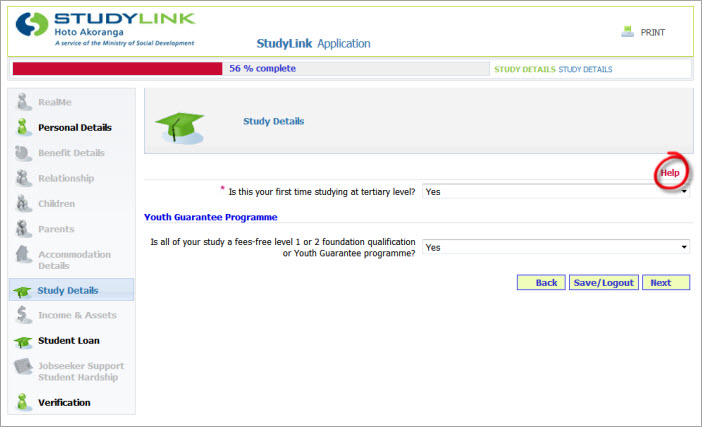
    Highlight help link
  • Can’t continue to the next page

    If you can’t proceed to the next page of the application after you clicked the ‘Next’ button, check the error message which appears above the questions.
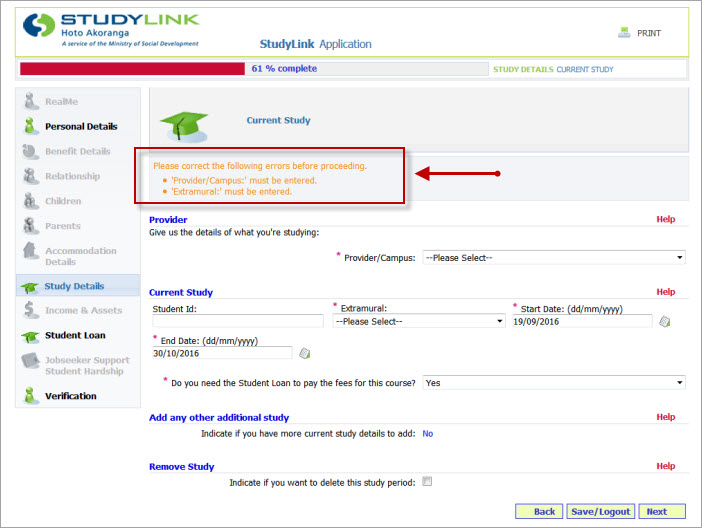
    Highlight error messages
  • Entering dates

    Dates should be entered as day/month/year, eg 31/01/2017

    Tip

    The icon beside the text box links to a pop-up calendar which you can use to select a date and it will enter it in the correct format.
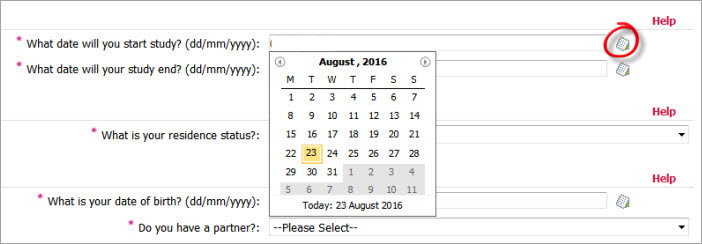
    Highlight calendar icon
  • Course dates

    Course dates don’t need to be exact as we’ll check this with your education provider. You can:

    • estimate the dates in the form, but be as close as possible
    • update the course dates in MyStudyLink after you submit your application.
  • New Zealand Residence class visa holder

    To complete the eligibility test, you can estimate the date you were granted your residence class visa. Once you’ve submitted your application, we’ll ask for proof to support this date such as your:

    • passport showing your New Zealand residence class visa, or
    • letter from New Zealand Immigration stating you’ve been granted residency.

    We can then update the date you provided in your application at this point.

  • Australian citizens

    When you apply for your Student Allowance or Student Loan, on the Residency questions:

    • residence status — select "Residence class visa holder"
    • date you were granted your residence class visa — enter the earliest date you came to New Zealand to live.

    You'll need to provide evidence of the length of time you've resided in New Zealand, eg:

    • a New Zealand school leavers certificate (confirming how long you attended that school)
    • a tenancy agreement
    • bank statement
    • hire purchase agreement over 3 years old.

    This should show that you've been ordinarily resident for three continuous years.

    Being ordinarily resident means that you consider New Zealand your home, you normally live here and intend to stay here permanently.

  • Secondary school

    You’ll need to answer whether your application is for study at:

    • 'High School or Secondary School'
    • 'Tertiary'.

    Secondary school is also known as high school or college.

  • Eligibility test results say you don’t qualify

    You can apply for all types of assistance even if the eligibility test results say otherwise. A final decision on whether you qualify will only be made once you submit an application. To apply, continue to the online application and click on ‘assistance you may not be eligible for’. You'll then be able to select what you want to apply for.
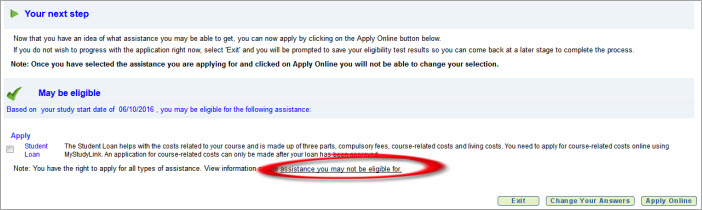
    Eligibility test - select assistance you may not get
  • Born overseas

    You can estimate the dates when you:

    • were granted your residence class visa or citizenship, and/or
    • came to New Zealand to live.

    Once you’ve submitted your application, we’ll ask for proof to support this date such as your:

    • passport showing your New Zealand residence class visa, or
    • letter from New Zealand Immigration stating you’ve been granted residency, or
    • citizenship certificate.

    We can then update the dates you provided in your application at this point.

  • Entering your bank account number

    Date you want to start using your bank account

    Enter the date you’re applying rather than the start of your course as course related costs may be paid earlier.

    If you’ve saved an application and finish it a later date, you may need to change the date you want to start using your bank account as you won’t be able to continue to the next page if the start date has passed.

    ANZ (previously National)

    If you have an ANZ bank account, but you used to be with National, choose the bank code and bank name '06 ANZ' in the drop down box.

    The Co-operative Bank

    The Co-operative Bank has the same prefix as the BNZ. Select 02- BNZ as your account prefix.

    Credit unions

    Credit unions will have given you an account number for the bank that they use. Use this bank account number, not your credit union customer number. If you don’t have this bank account number, contact your Credit Union.

    Invalid bank account number

    Please check your account number against your bank statement through online banking or by calling your bank.

  • Study details

    If you’re applying for both Student Allowance and Loan, on the Study Details section, make sure that you assign the study details for both the Student Allowance and Loan. Otherwise, you won’t be able to continue to the next part of the application.
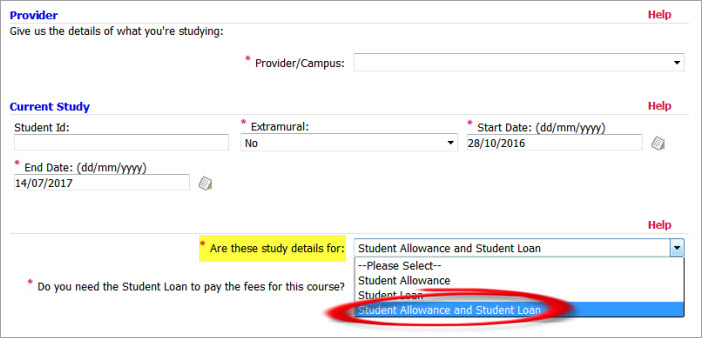
    Study details section
  • Overdue Student Loan

    When you have a Student Loan you may have repayment obligations eg, if you’re earning income. The questions about your overdue Student Loan refer to whether you’re meeting your repayment obligations. You’ll need to answer whether:

    • you have an overdue Student Loan repayment obligation of $500 or more
    • some of this amount has been overdue for a year or more.

    If you’re meeting your repayment obligations, select ‘No’.

    If you're not meeting your repayment obligations, you need to make repayments to Inland Revenue to reduce the default amount. You may be able to get a Student Loan after you've done this - you'll need to talk to us.

    We check this detail with Inland Revenue.

    Check your Student Loan balance with Inland Revenue online
  • Where to find your saved or submitted online application

    
    Log in to apply online

    Once logged in, you can:

    • continue working on a saved eligibility test or application
    • start a new eligibility test or application.

    Submitted application

    Once you've submitted your application you won't be able to view it.

    If something changes

    You can update your personal information and study details in MyStudyLink

  • If you don’t get a confirmation email

    If you don’t get an email from us within an hour of submitting an online application, it’s likely an error happened and you may need to complete a new application.

  • Affected by the Christchurch tragedy

    If you're starting study on or after 1 January 2021 you won't need to meet our normal residence criteria for permanent residents if:

    • you're on a Christchurch Response 2019 Permanent Resident Visa, or
    • you would've been eligible for a Christchurch Response Visa but already had another permanent residence visa.

    Income from donations or gifts your parents received following the Christchurch Mosque Attacks. This can include interest payments or income from investments. This applies to Student Allowances starting on or after 1 January 2021.

linksRelated links

Documents supporting your application

How we can help

  • Starting study
  • In study
  • Returning to study
  • Finished studying

Online services

  • Eligibility test
  • MyStudyLink
  • Declare income

About

  • About StudyLink
  • About this site
  • Access keys
  • Privacy, disclaimer and copyright

Contact us

  • How to contact us
  • Facebook
Ministry of Social Development logo govt.nz - connecting you to New Zealand central & local government services shielded